Pomodoro Bar · Windows app
Keep time in sight.
A tiny, always-on-top Pomodoro timer that stays visible while you work. A separate editor handles the settings. The bar handles the countdown.
Free · Windows 10 or later · 64-bit · No administrator rights needed
The installer includes .NET. Launch Pomodoro Bar from the desktop or Start menu; the editor and floating bar open together.
Release notes & portable download
Small enough to stay out of your way.
Resize the complete bar down to 130 × 20 Windows device-independent pixels. Move it by dragging the background or digits. Keep it visible over ordinary windows while you read, write, or code.
The countdown shifts from white through green, yellow, orange, and red. The circle tracks progress through the entire focus-and-break cycle.
Set it. Then focus.
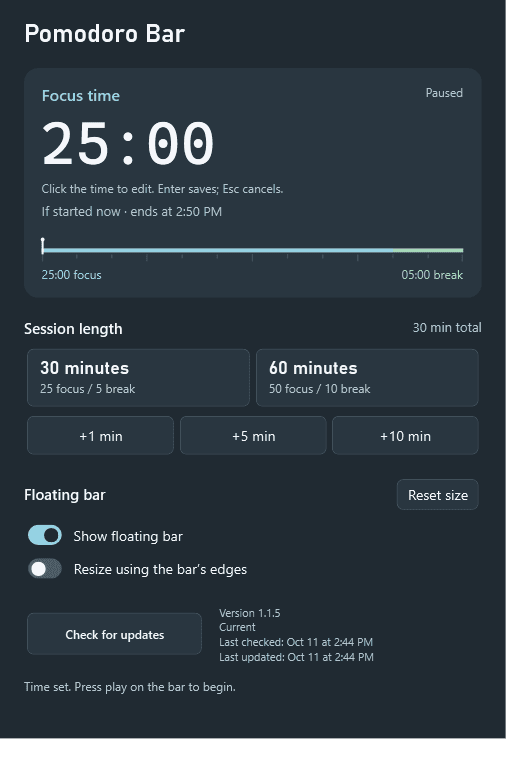
Choose a 30-minute cycle: 25 minutes of focus and a 5-minute break. Or choose a 60-minute cycle: 50 plus 10. Add 1, 5, or 10 minutes, or click the countdown to edit the current section directly.
The editor previews when the section will end, rounded to the nearest minute. Hide or close either window independently; the timer keeps running.
Reminders you can hear.
Reminders pulse and play increasingly distinct sounds as focus time runs out. At zero, the timer flashes and repeats its completion sound until you silence it. The next section waits for acknowledgement.
Any interaction with the bar silences audio. Use its circle, play, or skip control to acknowledge completion and advance.
Before you download
This is a Windows desktop app, not a browser timer. There are no macOS, Linux, or mobile builds. Exclusive full-screen apps and Windows secure screens can cover the bar.
Separate focus and break fields and an adjustable ratio control are still proposed. Today, you edit the current section; the other section keeps its existing duration.
Settings are stored locally outside the installation folder and survive updates. The app checks for updates at startup and every four hours. You can also check from the editor; downloads and restart helpers run in the background.
Built by Elliot Drel
I wanted a timer I could make genuinely small, keep on screen, and adjust without turning the bar into a settings panel. Pomodoro Bar is a native C# and WPF app.